Permalink copied!
The overall specification of how the interpreter
evaluates a
function application
remains the same as when we first introduced it in
section 1.1.4:
[1]
-
To evaluate
an application:
- Evaluate the subexpressions of the application.
- Apply the value of the function subexpression to the values of the argument subexpressions.
In the environment model of evaluation, a
function
is always a pair consisting of some code and a pointer to an environment.
Functions
are created in one way only: by evaluating a
lambda
expression.
This produces a
function
whose code is obtained from the text of the
lambda
expression and whose environment is the environment in which the
lambda
expression was evaluated to produce the
function.
For example, consider the
function declaration
function square(x) {
    return x * x;
}
evaluated in the
program
environment. The
function declaration
syntax is
equivalent to
an underlying implicit
lambda
expression. It would have been equivalent to have used
[2]
const square = x => x * x;
which evaluates
x => x * x
and binds square to the resulting value, all
in the
program
environment.
Figure 3.4
shows the result of evaluating this
declaration statement.
The global environment encloses the program environment. To reduce
clutter, after this figure we will not display the global environment
(as it is always the same), but we are reminded of its existence by the
pointer from the program environment upward.
The
function
object is a pair whose code specifies that the
function
has one
parameter, namely x, and a
function
body
return x * x;.
The environment part of the
function
is a pointer to the program environment, since that is the environment in
which the
lambda
expression was evaluated to produce the
function.
A new binding, which associates the
function
object with the
name
square, has been added
to the program frame.
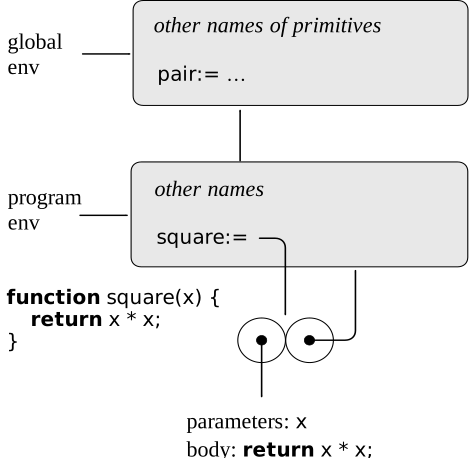
Figure 3.4
Environment structure produced by evaluating
function square(x) { return x * x; }
in the program environment.
In general, const,
function, and
let
add bindings to frames.
Assignment is forbidden on constants, so our environment model
needs to distinguish names that refer to constants
from names that refer to variables. We indicate that
a name is a constant by writing an equal sign after the colon
that follows the name.
We consider function declarations as equivalent to constant
declarations;
observe the equal signs after the colons in
figure 3.4.
[3]
Now that we have seen how
functions
are created, we can describe how
functions
are applied. The environment model specifies: To apply a
function
to arguments, create a new environment containing a frame that binds the
parameters to the values of the arguments. The enclosing environment of
this frame is the environment specified by the
function.
Now, within this new environment, evaluate the
function
body.
To show how this rule is followed,
figure 3.6
illustrates the environment structure created by evaluating the
expression
square(5)
in the
program
environment, where square is the
function
generated in
figure 3.4.
Applying the
function
results in the creation of a new environment, labeled E1 in the figure, that
begins with a frame in which x, the
parameter for the
function,
is bound to the argument 5.
Note that name x in environment E1 is
followed by a colon with no equal sign, which indicates
that the parameter x is treated as a
variable.
The pointer leading upward from this frame shows that the
frame's enclosing environment is the
program
environment. The
program
environment is chosen here, because this is the environment that is
indicated as part of the square
function
object. Within E1, we evaluate the body of the
function,
return x * x;.
Since the value of x in E1 is 5, the result is
5 * 5,
or 25.
[4]
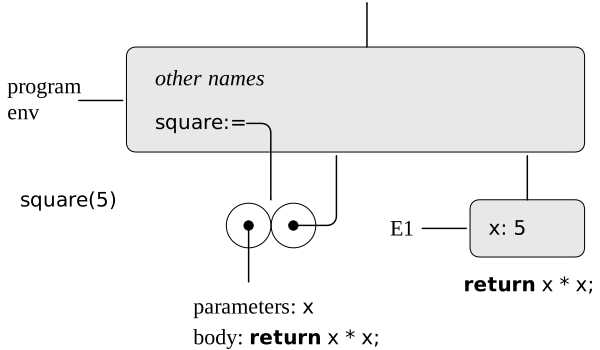
Figure 3.6
Environment created by evaluating
square(5)
in the program environment.
The environment model of
function
application can be summarized by two
rules:
- A function object is applied to a set of arguments by constructing a frame, binding the parameters of the function to the arguments of the call, and then evaluating the body of the function in the context of the new environment constructed. The new frame has as its enclosing environment the environment part of the function object being applied. The result of the application is the result of evaluating the return expression of the first return statement encountered while evaluating the function body.
- A function is created by evaluating a lambda expression relative to a given environment. The resulting function object is a pair consisting of the text of the lambda expression and a pointer to the environment in which the function was created.
Finally, we specify the behavior of assignment, the operation that
forced us to introduce the environment model in the first place.
Evaluating the expression
$name$ = $value$
in some environment
locates the binding of the name in the environment.
That is, one finds the first frame in the environment that contains a
binding for the name.
If the binding is a variable binding—indicated in the frame by
just :
after the name—that binding is changed to reflect the new
value of the variable.
Otherwise, if the binding in the frame is a constant
binding—indicated
in the frame by :=
after the name—the assignment signals an
"assignment to constant" error.
If the name is unbound in the environment, then
the assignment signals a
"variable undeclared" error.
These evaluation rules, though considerably more complex than the
substitution model, are still reasonably straightforward. Moreover,
the evaluation model, though abstract, provides a correct description
of how the interpreter evaluates expressions. In chapter 4 we shall
see how this model can serve as a blueprint for implementing a working
interpreter. The following sections elaborate the details of the
model by analyzing some illustrative programs.
[1]
Assignment introduces a subtlety
into step 1 of the evaluation rule. As shown in
exercise , the
presence of assignment allows us to write expressions that will
produce different values depending on the order in which the
subexpressions in a combination
are evaluated. To eliminate such ambiguities,
JavaScript specifies left-to-right evaluation of the
subexpressions of combinations and of the argument expressions
of applications.
3.2.1
The Rules for Evaluation