With the implementation of the explicit-control evaluator we come to the end of a development, begun in chapter 1, in which we have explored successively more precise models of the evaluation process. We started with the relatively informal substitution model, then extended this in chapter 3 to the environment model, which enabled us to deal with state and change. In the metacircular evaluator of chapter 4, we used JavaScript itself as a language for making more explicit the environment structure constructed during evaluation of an component. Now, with register machines, we have taken a close look at the evaluator's mechanisms for storage management, argument passing, and control. At each new level of description, we have had to raise issues and resolve ambiguities that were not apparent at the previous, less precise treatment of evaluation. To understand the behavior of the explicit-control evaluator, we can simulate it and monitor its performance.
We will install a driver loop in our evaluator machine. This plays the role of the driver_loop function of section 4.1.4. The evaluator will repeatedly print a prompt, read a program, evaluate the program by going to eval_dispatch, and print the result. If nothing is entered at the prompt, we jump to the label evaluator_done, which is the last entry point in the controller. The following instructions form the beginning of the explicit-control evaluator's controller sequence:[1] "read_evaluate_print_loop", perform(list(op("initialize_stack"))), assign("comp", list(op("user_read"), constant("EC-evaluate input:"))), assign("comp", list(op("parse"), reg("comp"))), test(list(op("is_null"), reg("comp"))), branch(label("evaluator_done")), assign("env", list(op("get_current_environment"))), assign("val", list(op("scan_out_declarations"), reg("comp"))), save("comp"), // so we can use it to temporarily hold $\texttt{*unassigned*}$ values assign("comp", list(op("list_of_unassigned"), reg("val"))), assign("env", list(op("extend_environment"), reg("val"), reg("comp"), reg("env"))), perform(list(op("set_current_environment"), reg("env"))), restore("comp"), // the program assign("continue", label("print_result")), go_to(label("eval_dispatch")), "print_result", perform(list(op("user_print"), constant("EC-evaluate value:"), reg("val"))), go_to(label("read_evaluate_print_loop")), We store the current environment, initially the global environment, in the variable current_environment and update it each time around the loop to remember past declarations. The operations get_current_environment and set_current_environment simply get and set this variable.
let current_environment = the_global_environment;

function get_current_environment() {
    return current_environment;
}

function set_current_environment(env) {
    current_environment = env;
}
When we encounter an
error in a
function
(such as the
unknown function type
error
indicated at
apply_dispatch),
we print an error message and return to the driver loop.[2]
"unknown_component_type",
assign("val", constant("unknown syntax")),
go_to(label("signal_error")),
"unknown_function_type",
restore("continue"), // clean up stack (from $\texttt{apply_dispatch}$)
assign("val", constant("unknown function type")),
go_to(label("signal_error")),
"signal_error",
perform(list(op("user_print"),
constant("EC-evaluator error:"), reg("val"))),
go_to(label("read_evaluate_print_loop")),
For the purposes of the simulation, we initialize the stack each time through the driver loop, since it might not be empty after an error (such as an undeclared name) interrupts an evaluation.[3]
If we combine all the code fragments presented in sections 5.4.1–5.4.4, we can create an evaluator machine model that we can run using the register-machine simulator of section 5.2. const eceval = make_machine(list("comp", "env", "val", "fun", "argl", "continue", "unev"), eceval_operations, list("read_evaluate_print_loop", $\langle{}$entire machine controller as given above$\rangle$ "evaluator_done")); We must define JavaScript functions to simulate the operations used as primitives by the evaluator. These are the same functions we used for the metacircular evaluator in section 4.1, together with the few additional ones defined in footnotes throughout section 5.4. const eceval_operations = list(list("is_literal", is_literal), $\langle\mathit{complete}\;\,\mathit{list}\;\,\mathit{of}\;\mathit{operations}\:\,\mathit{for}\;\,\mathit{eceval}\;\,\mathit{machine}\rangle$);
Finally, we can initialize the global environment and run the evaluator:
const the_global_environment = setup_environment();
start(eceval);
EC-evaluate input:
function append(x, y) {
    return is_null(x)
           ? y
           : pair(head(x), append(tail(x), y));
}
EC-evaluate value: undefined
EC-evaluate input:
append(list("a", "b", "c"), list("d", "e", "f"));EC-evaluate value: ["a", ["b", ["c", ["d", ["e", ["f", null]]]]]]
Of course, evaluating programs in this way will take much longer than if we had directly typed them into JavaScript, because of the multiple levels of simulation involved. Our programs are evaluated by the explicit-control-evaluator machine, which is being simulated by a JavaScript program, which is itself being evaluated by the JavaScript interpreter.
Simulation can be a powerful tool to guide the implementation of evaluators. Simulations make it easy not only to explore variations of the register-machine design but also to monitor the performance of the simulated evaluator. For example, one important factor in performance is how efficiently the evaluator uses the stack. We can observe the number of stack operations required to evaluate various programs by defining the evaluator register machine with the version of the simulator that collects statistics on stack use (section 5.2.4), and adding an instruction at the evaluator's print_result entry point to print the statistics: "print_result", perform(list(op("print_stack_statistics"))), // added instruction // rest is same as before perform(list(op("user_print"), constant("EC-evaluate value:"), reg("val"))), go_to(label("read_evaluate_print_loop")), Interactions with the evaluator now look like this:
EC-evaluate input:
function factorial (n) {
    return n === 1
           ? 1
           : factorial(n - 1) * n;
}
total pushes = 4 maximum depth = 3 EC-evaluate value: undefined
EC-evaluate input:
factorial(5);
total pushes = 151
maximum depth = 28
EC-evaluate value:
120
function factorial(n) {
    function iter(product, counter) {
        return counter > n
               ? product
               : iter(counter * product,
                      counter + 1);
    }
    return iter(1, 1);
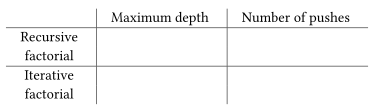
}- You will find that the maximum depth required to evaluate $n!$ is independent of $n$. What is that depth?
- Determine from your data a formula in terms of $n$ for the total number of push operations used in evaluating $n!$ for any $n \geq 1$. Note that the number of operations used is a linear function of $n$ and is thus determined by two constants.
function factorial(n) {
    return n === 1
           ? 1
           : factorial(n - 1) * n;
}
function fib(n) {
    return n < 2 ? n : fib(n - 1) + fib(n - 2);
}- Give a formula in terms of $n$ for the maximum depth of the stack required to compute ${\textrm{Fib}}(n)$ for $n \geq 2$. Hint: In section 1.2.2 we argued that the space used by this process grows linearly with $n$.
-
Give a formula for the total number of pushes used to compute
${\textrm{Fib}}(n)$ for
$n \geq 2$. You should find that the number
of pushes (which correlates well with the time used) grows exponentially
with $n$. Hint: Let
$S(n)$ be the number of pushes used in
computing ${\textrm{Fib}}(n)$. You should be
able to argue that there is a formula that expresses
$S(n)$ in terms of
$S(n-1)$, $S(n-2)$,
and some fixed
overhead
constant $k$ that is independent of $n$. Give the formula, and say what $k$ is. Then show that $S(n)$ can be expressed as $a {\textrm{Fib}}(n+1) + b$ and give the values of $a$ and $b$.
- Errors that occur in the evaluation process, such as an attempt to access an unbound name, could be caught by changing the lookup operation to make it return a distinguished condition code, which cannot be a possible value of any user name. The evaluator can test for this condition code and then do what is necessary to go to signal_error. Find all of the places in the evaluator where such a change is necessary and fix them. This is lots of work.
- Much worse is the problem of handling errors that are signaled by applying primitive functions such as an attempt to divide by zero or an attempt to extract the head of a string. In a professionally written high-quality system, each primitive application is checked for safety as part of the primitive. For example, every call to head could first check that the argument is a pair. If the argument is not a pair, the application would return a distinguished condition code to the evaluator, which would then report the failure. We could arrange for this in our register-machine simulator by making each primitive function check for applicability and returning an appropriate distinguished condition code on failure. Then the primitive_apply code in the evaluator can check for the condition code and go to signal_error if necessary. Build this structure and make it work. This is a major project.
kernel panicor a
blue screen of deathor even a reboot. Automatic rebooting is an approach typically used on phones and tablets. Most modern operating systems do a decent job of preventing user programs from causing an entire machine to crash.